
iPhone app Time with My Parents

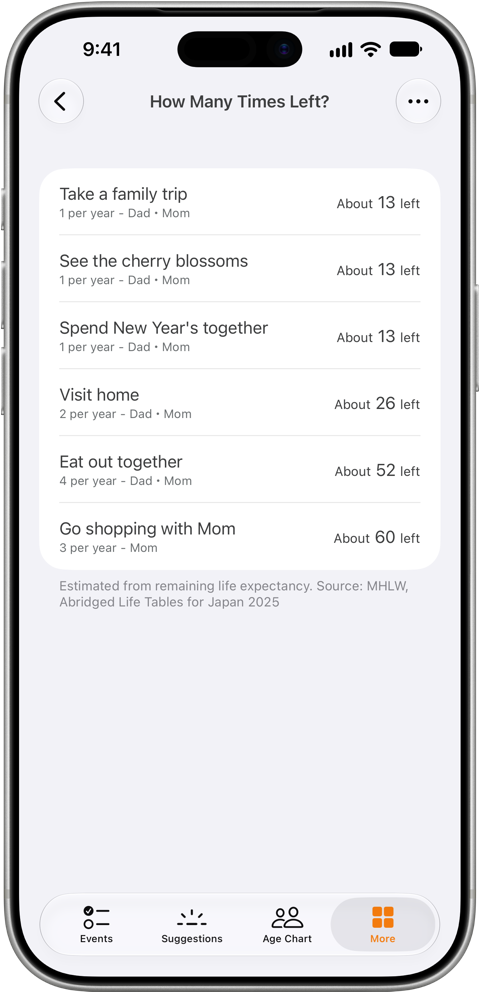
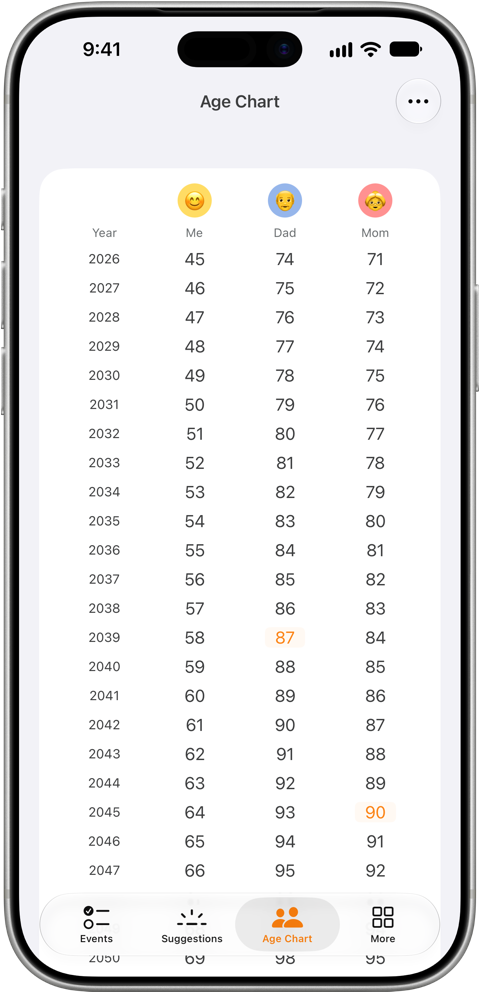
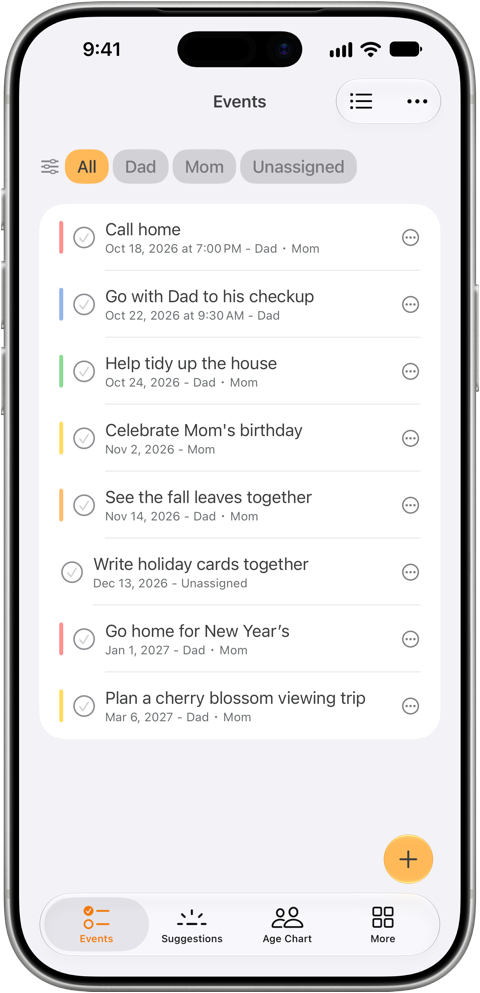
The app shows an age chart with your family’s ages year by year, and an estimate of how many more times you can do things with your parents, such as seeing the cherry blossoms or taking a family trip. You can keep your plans with your parents in a list and a calendar, and set a reminder for each plan.

Download on the App Store

Set up in a minute · Free (with ads) · iPhone · iOS 26 or later

Age Chart screen: each year with your age and your parents’ ages; the year each parent reaches their current age plus remaining life expectancy is highlighted“How Many Times Left?” screen: how many more times you can do things with your parents, such as seeing the cherry blossoms or taking a family trip

This app is for you if you

  • Live far from your parents
  • Aren’t quite sure how old your parents are
  • Have trouble recalling even your own age these days
  • Keep putting your parents last, caught up in work and childcare
  • Carry a vague sense of “is this really okay?”

What the app does

The app has three main features: the Age Chart, How Many Times Left?, and Plans & Calendar.

Time with My Parents: Age Chart

01

Age Chart

Shows your age and the ages of your parents and other family members, year by year. The year each person reaches their current age plus their remaining life expectancy (MHLW, Abridged Life Tables for Japan 2025) is marked in color. If you don’t know a parent’s birth year, you can build the chart from their age alone.
Time with My Parents: How Many Times Left?

02

How Many Times Left?

Add an activity and how often you do it, such as “See the cherry blossoms (once a year)”, and the app shows an estimate of how many more times you can do it with your parents.

Time with My Parents: Plans & Calendar

03

Plans & Calendar

The Events tab is only for your plans with your parents. Your usual calendar may be full, but if you pull out just the plans to see your parents, you’ll notice there are hardly any. That’s why the app deliberately keeps them separate from your own schedule. Comparing them with your own calendar takes a little effort, but that effort gives you a chance to think about your time with your parents. You can set a reminder for each plan and check off plans when they’re done.

And more

Suggestions

When you can’t think of what to do, pick an idea from the Suggestions tab and add it to your plans.

Widgets (Premium)

See your upcoming plans on the Home Screen at any time.

Calculate to a Set Age (Premium)

Set an age for each family member to use instead of remaining life expectancy.

Pricing

Core features are free. Premium is a one-time purchase with no subscription.

FeatureFree$0with adsPremium$5.99one-time
Age ChartIncludedIncluded
How Many Times Left?IncludedIncluded
Plans & CalendarIncludedIncluded
SuggestionsIncludedIncluded
RemindersIncludedIncluded
AdsShownNone
Home Screen widgetsNot includedIncluded
Calculate to a set ageNot includedIncluded

Premium is an in-app purchase. One purchase unlocks all Premium features. Prices shown are for the U.S. App Store. Prices and currencies differ by country or region, so check the App Store for the price where you live.

Frequently asked questions

01Where do the remaining life expectancy figures come from?

From the Abridged Life Tables for Japan 2025 published by Japan’s Ministry of Health, Labour and Welfare (MHLW). The app uses the remaining life expectancy for each age from 0 to 105, separately for men and women. For example, a 72-year-old man has 14.31 years left on average, so the Age Chart highlights the year he turns 86. With Calculate to a Set Age (Premium), you can set an age to use instead for each person.

02I'm not sure exactly how old my parents are. Can I still use it?

Yes. If you know the date of birth, the app calculates the age for you. If you’re not sure of the birth year, you can enter an approximate age and still build the age chart. Next time you see your parents, it’s a good chance to ask their exact age.

03Do I need to register an email address?

No. You don’t need to register an email address or create an account, and you can start right after installing the app. When you first set up profiles, you enter a nickname, gender and date of birth (or age) for yourself and your parents.

04Is it free? What does Premium add?

The core features (Age Chart, How Many Times Left?, Plans & Calendar, and Suggestions) are free, with ads. A one-time Premium purchase ($5.99 in the U.S.) removes ads, adds Home Screen widgets and lets you calculate to a set age. There is no subscription.

05Is there an Android version?

Not currently. The app is available for iPhone (iOS 26 or later) on the App Store.

06What was the reason for making this app?

It started with the tension an editor at the Time with My Parents Secretariat felt on the day they counted their parents’ ages and the years left until average life expectancy. They made the app so they would never forget that feeling.

Notice: We revised the app’s Terms of Service on September 27, 2026. Read the Terms of Service

Time with My Parents

Both you and your parents are younger today than you’ll ever be again.

“Someday” has a way of never arriving. Why not start by entering your family’s birthdays and looking at the age chart?

Download on the App Store
  • Set up in a minute
  • Free
  • iPhone · iOS 26 or later
  • No subscription
The age chart screen of the app

Try the web calculator first (in Japanese)